LiteLLM AI Gateway
This notebook is the runnable companion to the
LiteLLM AI Gateway how-to. It demonstrates
the production-shaped integration pattern: a Locus agent talks to a
LiteLLM AI Gateway via the existing OpenAIModel(base_url=...),
and the gateway handles every OCI-specific concern (RSA-SHA256 signing,
vendor adapters, fallbacks, virtual keys, budgets, observability, cost
tracking, caching, guardrails).
No new Locus model class. The gateway is OpenAI-shaped by design.
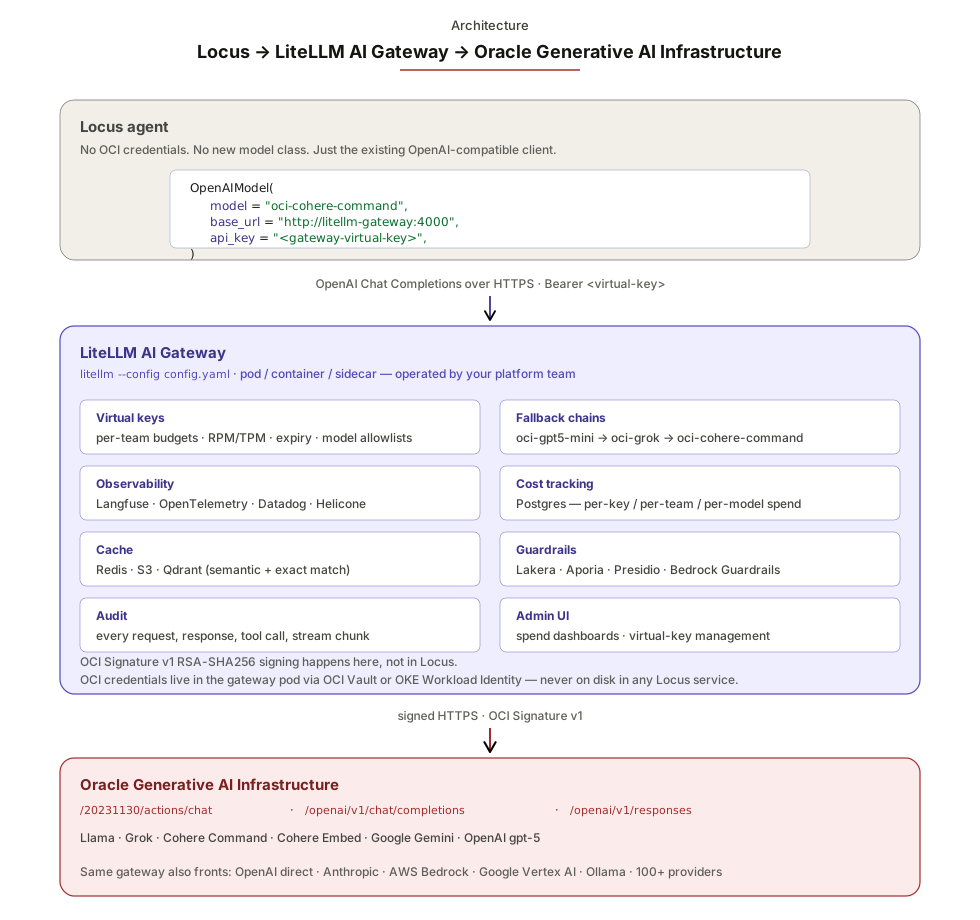
What the notebook does
- Health-checks the gateway at
LITELLM_GATEWAY_URLand prints the model aliases it exposes — surfaces config drift before any agent code runs. - Runs an
Agentbuilt aroundOpenAIModel(base_url=..., api_key=...)against the alias inLITELLM_GATEWAY_MODEL(defaultoci-cohere-command, defined inexamples/litellm-gateway/config.yaml). - Streams a response through the same agent to prove SSE flows end-to-end Locus → gateway → OCI.
When neither LITELLM_GATEWAY_URL nor LITELLM_GATEWAY_KEY is set,
the notebook prints the wiring snippet and exits cleanly — same
self-skip pattern as Locus's other infrastructure notebooks.
Prerequisites
# 1. Start the gateway (in another shell).
cd examples/litellm-gateway/
export OCI_REGION="us-chicago-1"
export OCI_USER="ocid1.user.oc1..xxx"
export OCI_FINGERPRINT="aa:bb:cc:..."
export OCI_TENANCY="ocid1.tenancy.oc1..xxx"
export OCI_KEY_FILE="$HOME/.oci/keys/your_api_key.pem"
export OCI_COMPARTMENT_ID="ocid1.compartment.oc1..xxx"
export LITELLM_MASTER_KEY="$(openssl rand -hex 32)"
docker compose up -d

# 2. Wire this notebook at the gateway.
export LITELLM_GATEWAY_URL="http://localhost:4000"
export LITELLM_GATEWAY_KEY="$LITELLM_MASTER_KEY"
export LITELLM_GATEWAY_MODEL="oci-cohere-command"

python examples/notebook_71_litellm_gateway.py
See also
docs/how-to/litellm-gateway.md— when the gateway is the right path; auth-boundary diagram; OKE deployment.examples/litellm-gateway/— the working sample:config.yaml,docker-compose.yml,helm-values.yaml.- Notebook 01 — OCI transports — the direct (no-gateway) OCI providers, the right default for single-tenant.